Description
A WooCommerce sales report tells you what you took. It does not tell you what you kept. The money that decides whether the month was good is scattered across a supplier invoice PDF, a shipping charge on a line item, a payment fee on a settlement statement and a folder of receipts.
The real problem is the gap. When a product cost is missing, that sale is counted at its full price, so a hole in your records reads as profit. An estimate can pass for a fact, and an order that looks healthy can be the one that lost money. Store Profit Ledger exists so those gaps are shown instead of hidden.
What it does
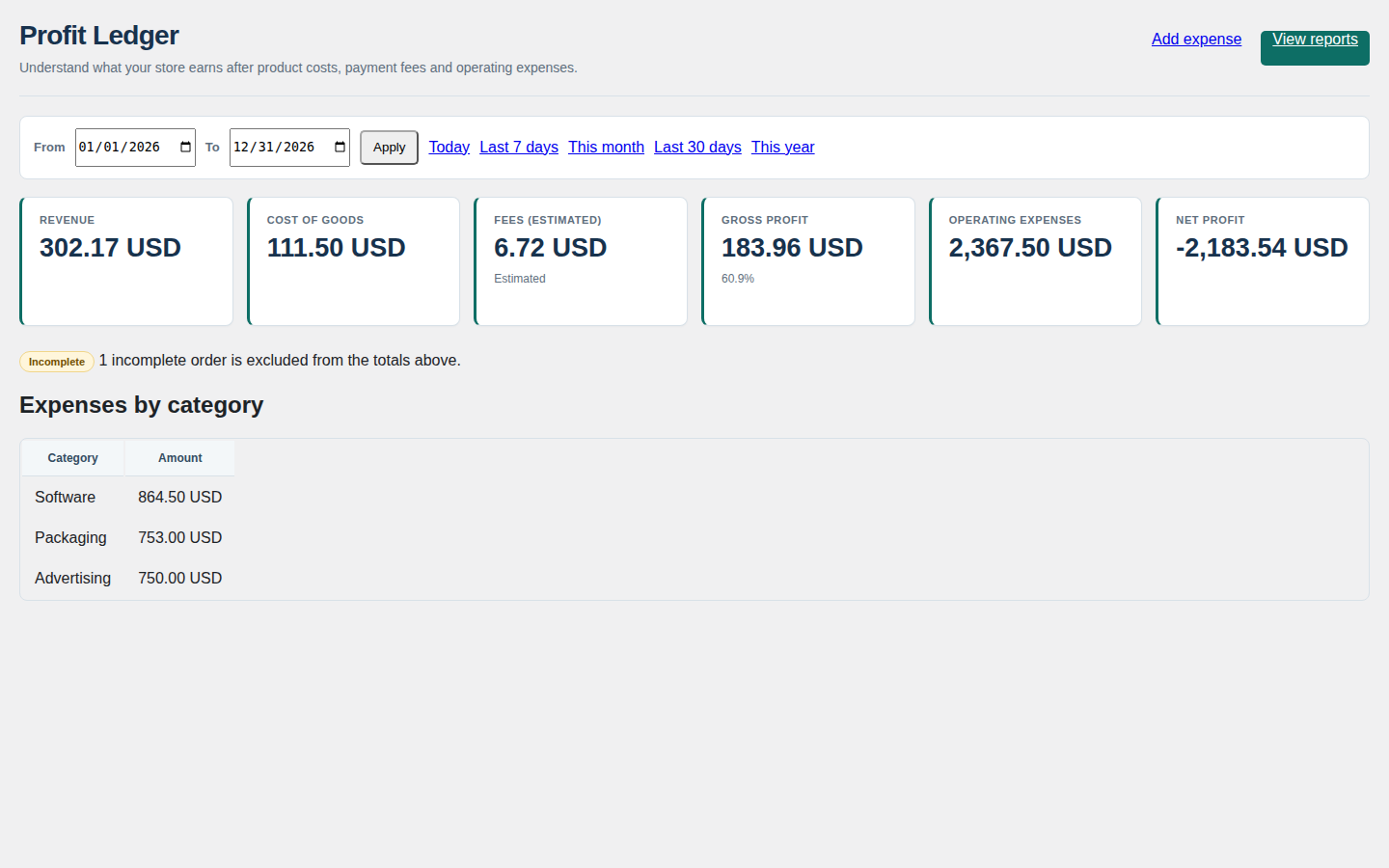
Store Profit Ledger puts those records in one place beside your orders. Keep a supplier directory and record supplier invoices with their line items, shipping, deposit and captured exchange rate; link an invoice line to a WooCommerce order, or link the invoice itself and let its order-less lines price that order. Products and variations without an invoice can carry a manual unit cost instead. Enter operating expenses by date, category and currency. The dashboard and Profit Reports then show revenue, cost, an estimated fee and what is left, and any order whose cost cannot be found is flagged incomplete and excluded from the totals rather than counted at full price.
Two rules keep the numbers honest
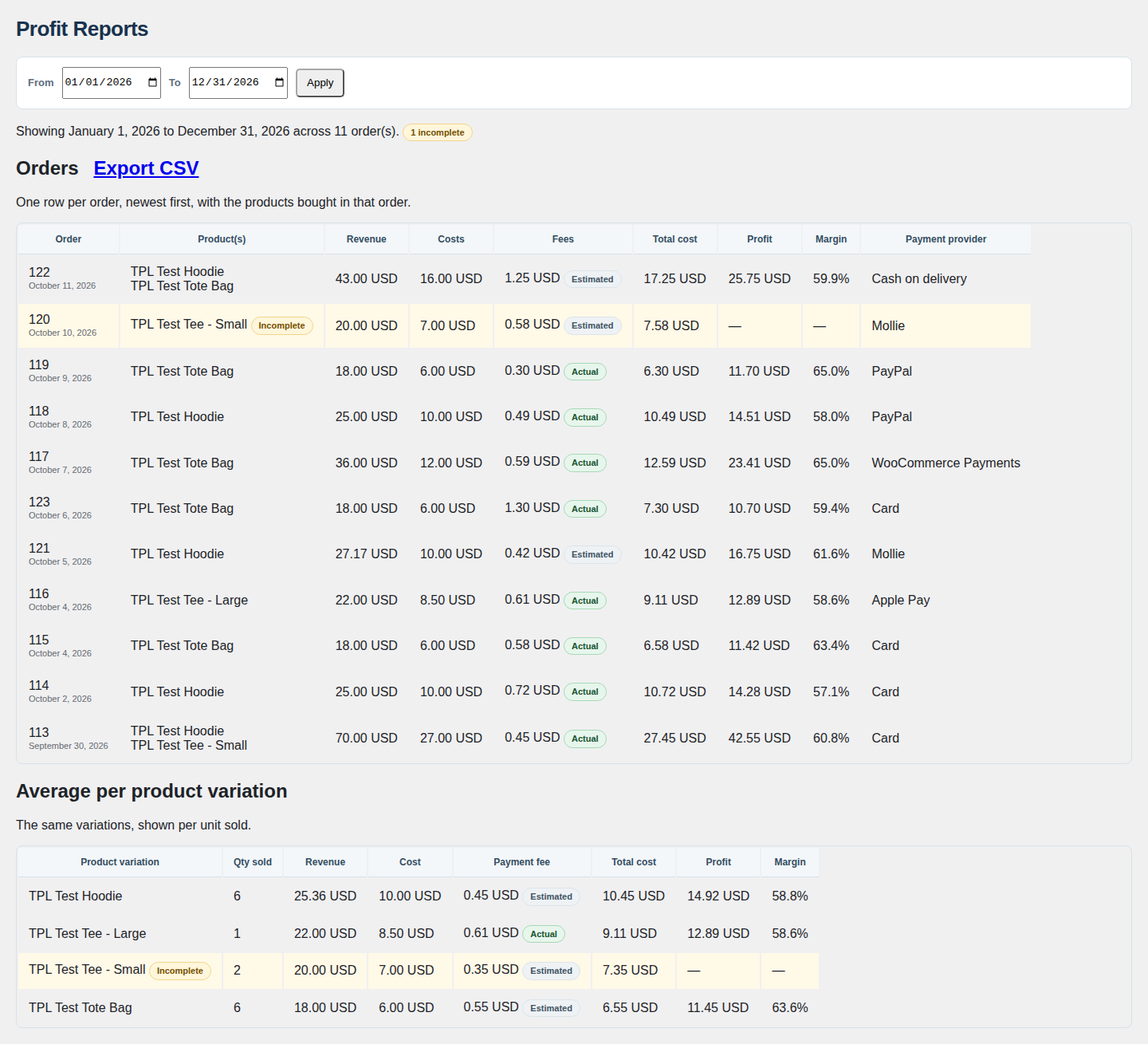
- A fee is a fact or it is labelled an estimate. When the gateway itself has recorded a verified fee on the order, that captured fee is used and labelled Actual. Every other fee is an estimate built from the percentage and fixed amount you configure and is labelled Estimated. The plugin contacts no live gateway fee API.
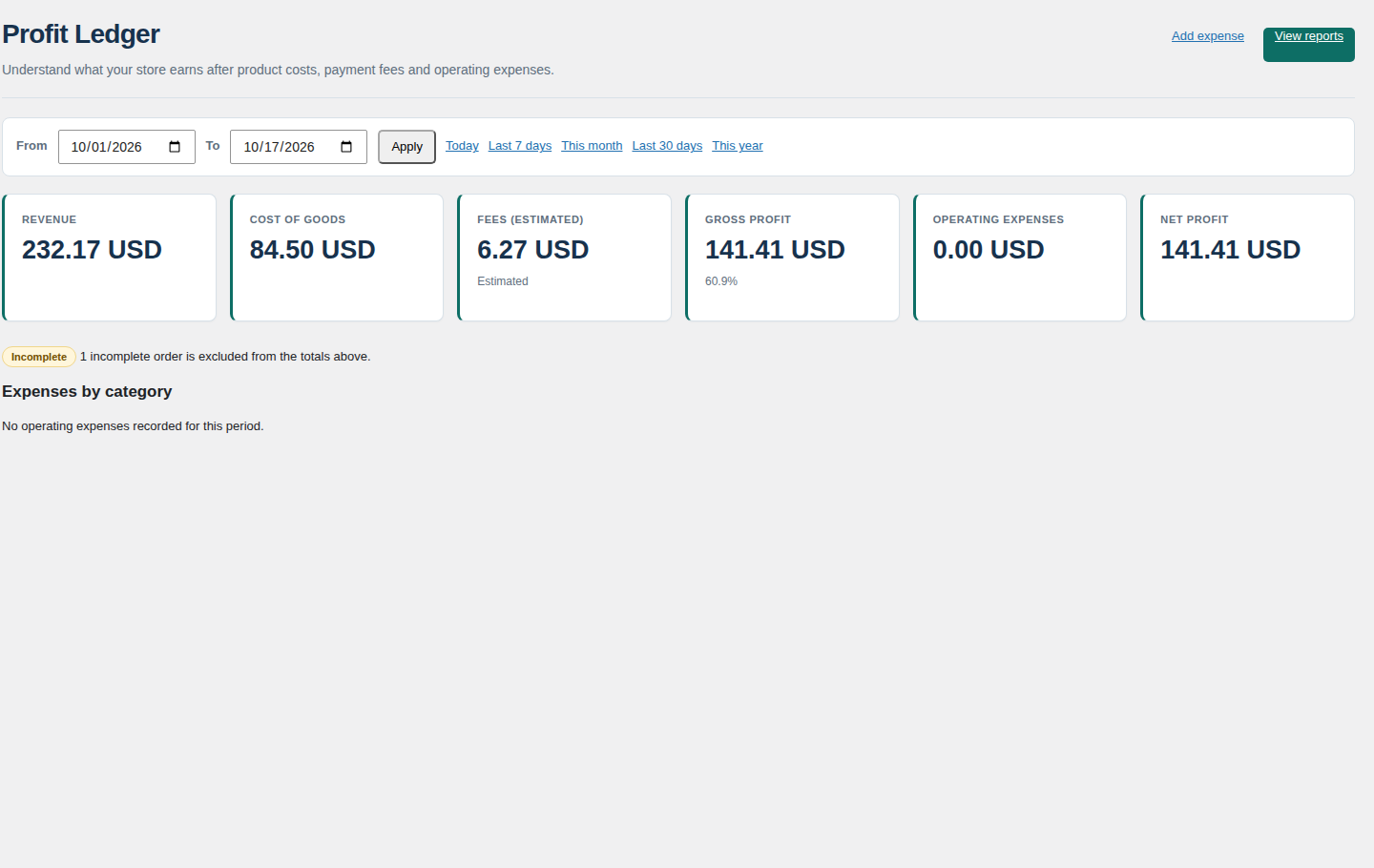
- A gap can never masquerade as profit. An order whose cost cannot be found is flagged incomplete, excluded from the totals and counted separately, so a missing figure is visible instead of quietly inflating the result.
Costs are frozen on the order when it is processed, so editing a supplier invoice later does not rewrite profit you have already reported. Exchange rates are captured when you enter each invoice or expense, and for new foreign-currency orders from a rate your installed multi-currency setup already stores locally. There is no external rate service and no guessed conversion.
From supplier invoice to order cost
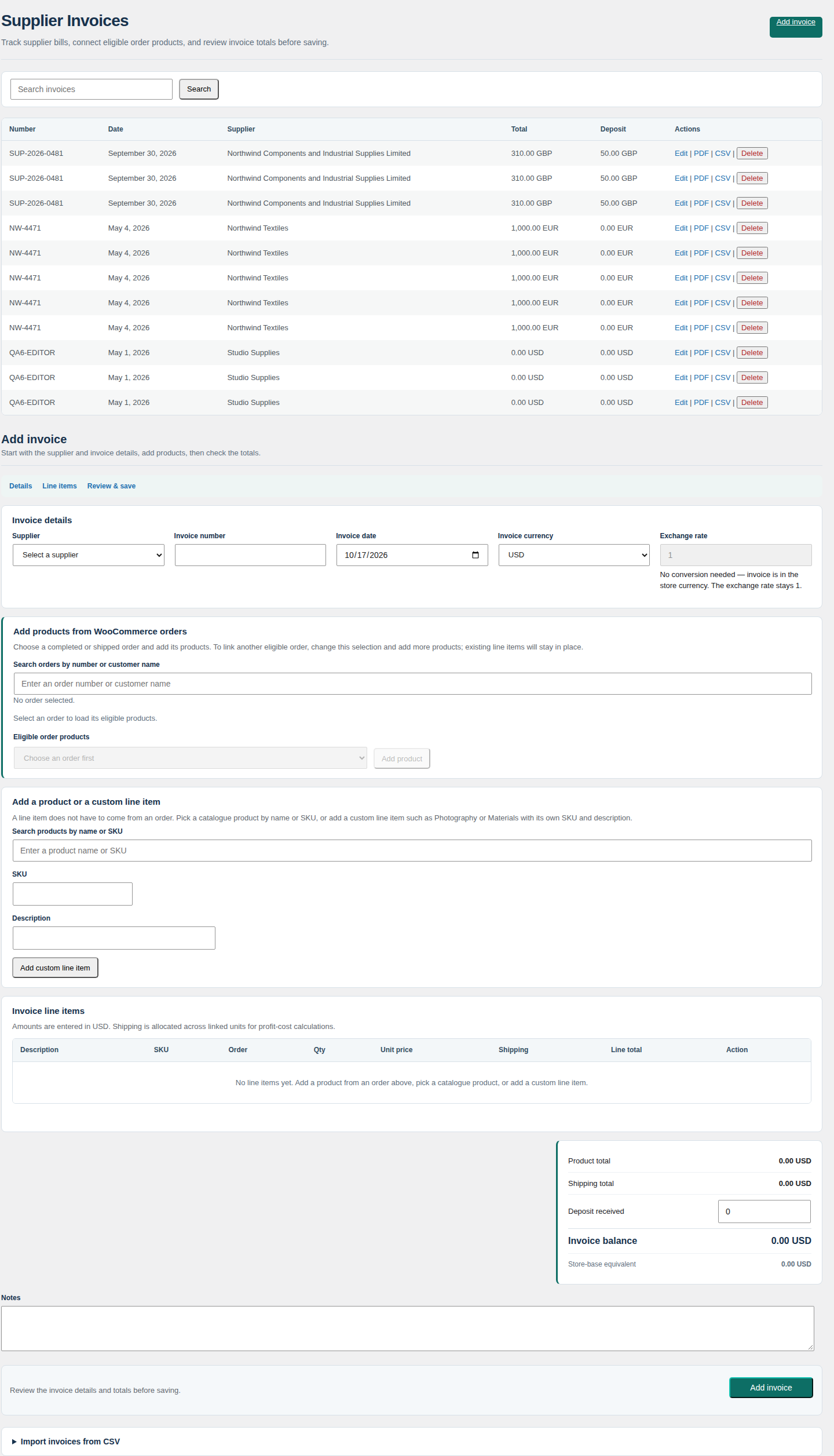
Record the invoice as it arrived — supplier, number, date, currency and exchange rate — then add its line items with SKU, description, quantity, unit price and line shipping. A line linked to a WooCommerce order prices that order; a line that is not linked does not borrow a cost from another order, so the gap stays visible instead of being filled with the wrong number. Import invoices from CSV through a preview step, download any invoice as a PDF, or export it as CSV.
Read the period, not just the sales
The dashboard turns the selected date range into a profit-and-loss view: revenue, cost of goods, fees, gross profit, operating expenses and net profit, with expenses summarised by category and the count of orders excluded for missing cost data shown in plain sight. Profit Reports gives one row per order with its products, revenue, costs, fees, total cost, profit and margin, plus an average-per-product-variation table for the same range.
Built so you can check it yourself
There are no reviews, ratings or install counts here to take on trust — the proof is structural. The complete plugin is free. Your suppliers, invoices, costs and expenses live in your own WordPress database. It makes no call to TillFoundry and no update-server call, sends no sales, customer or order data to advertising platforms, and this page names no gateway brand. It is HPOS compatible, and WooCommerce is required and declared. Deactivating the plugin leaves your ledger records in place, and deleting it removes none of them unless you explicitly enable that setting.
The offer
Store Profit Ledger is free to download and use: the complete plugin, no account, no key, no time limit and nothing gated. Updates are published on this page. TillFoundry builds small, focused WooCommerce tools; this one is complete and free.
What is included
This is the complete plugin. Every item below is in the download, with nothing held back and nothing time-limited.
- Supplier directory with contact, tax, bank and default-currency details.
- Supplier invoices with line items, shipping, deposits and captured exchange rates; CSV import with a preview step; PDF invoice download and CSV export.
- Manual product and variation costs, cost currency, and a target-margin price calculator.
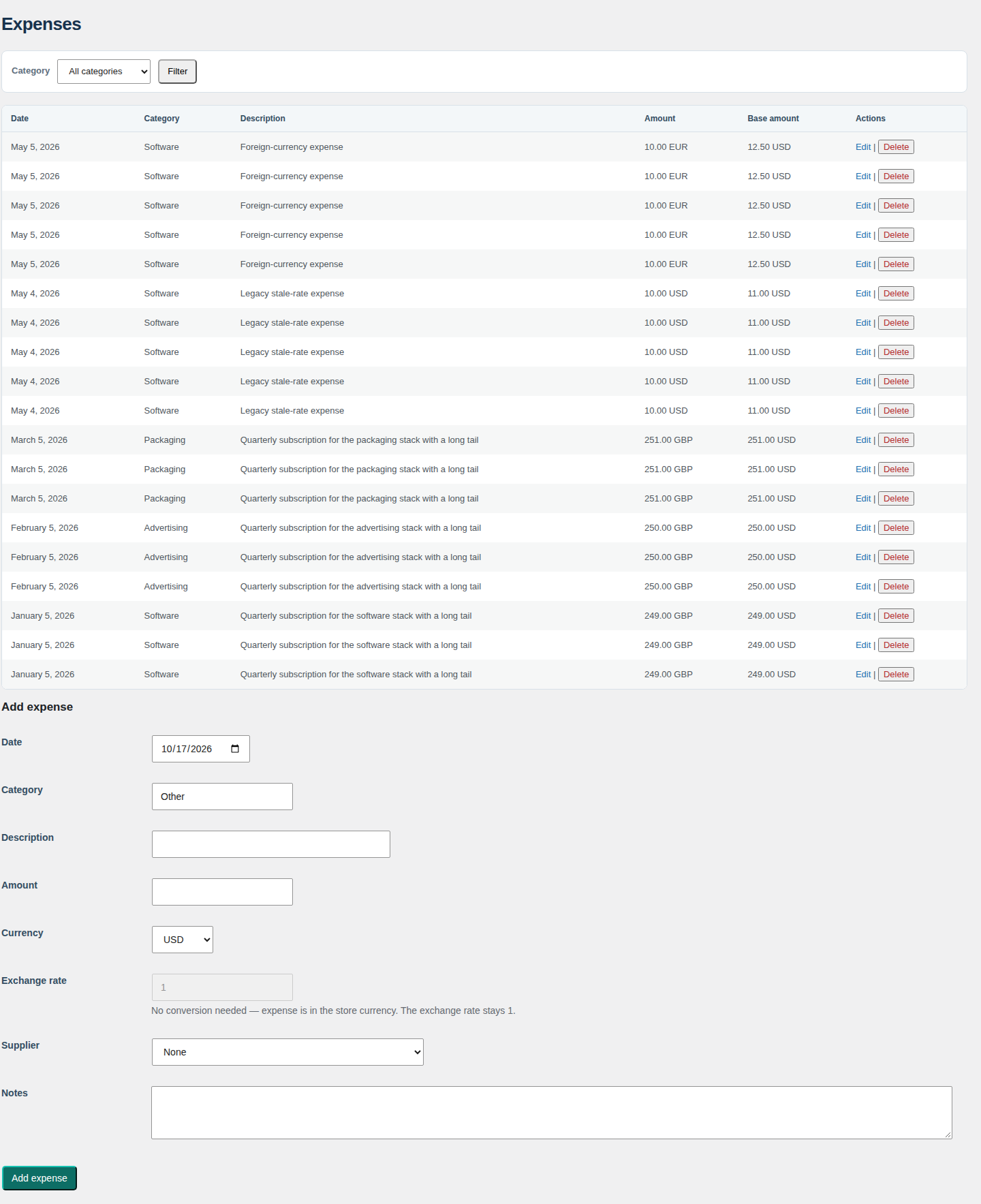
- Operating expenses by date, category, currency and captured exchange rate.
- Profit Reports with one row per order and an average-per-product-variation table over any date range, plus a period profit-and-loss dashboard.
- Estimated payment fees labelled as estimates, captured gateway fees where the gateway recorded one, and incomplete-cost flags.
- HPOS-compatible order reads and uninstall-time control over your data.
- Optional and off by default: read-only advertising connectors that retrieve account-level spend for the selected period and send no order or customer data; they have not been tested against live accounts in this environment.
How it works
- Install WooCommerce, then install Store Profit Ledger and open the Profit Ledger menu.
- Add a supplier and link an invoice to an order, or enter a unit cost on a product or variation.
- Read the dashboard and Profit Reports, and export any report or invoice to CSV or PDF.
Requirements
- WordPress: 6.0 or higher.
- PHP: 7.4 or higher.
- WooCommerce: required for activation. The plugin declares Requires Plugins: woocommerce, so on WordPress 6.5 and newer WordPress blocks activation without it.
- HPOS: compatible with WooCommerce High-Performance Order Storage, declared through WooCommerce’s own compatibility API.
Updates
Store Profit Ledger is free software under the GPL, version 2 or later. It is a download from this store — the version you download is the version you have, and a later release is published on this page.
Frequently asked questions
Does it work with HPOS?
Yes. Store Profit Ledger declares compatibility with WooCommerce High-Performance Order Storage and reads orders through WooCommerce’s own order APIs, so it works with either order storage mode.
Are the payment fees the real gateway fees?
Treat an Estimated fee as an estimate until you reconcile it against your gateway’s settlement report. When the order carries a fee the gateway already recorded, the report shows that captured figure and labels it Actual; otherwise it uses the percentage and fixed amount you configured. The plugin never contacts a gateway fee API.
What happens if a product has no cost?
An explicit cost of 0 is treated as a genuinely free product and included in profit. A missing cost is flagged incomplete: the affected row is excluded from the totals and counted, so a missing figure cannot masquerade as profit.
Is it really free?
Yes. This is the complete plugin — no account, no key, no expiry, and no call to TillFoundry. Every feature above ships in the download, and there is nothing to refund because nothing is charged.
Can I use it on client sites?
Yes. It is free software under the GPL, version 2 or later, so you can install it on as many sites as you maintain. There is no per-site key or activation count.
Where is my data stored?
Your suppliers, invoices, costs and expenses are stored in your own WordPress database and remain in place if you deactivate the plugin. Nothing is sent to TillFoundry. Deleting the plugin removes no ledger records unless you first enable Delete data on uninstall.
Download free. Store Profit Ledger is free to download and use: complete, no key, no time limit and nothing gated, with updates published on this page.
Reviews
There are no reviews yet.