Description
If you sell into more than one state, every filing period asks the same two questions: how much tax did I collect in this state, and have I crossed its economic-nexus threshold? WooCommerce records the tax on every order, but it cannot answer either one. There is no per-state filing report your bookkeeper can file from, no transaction count measured against that state’s own test, and no county, city and district split. So the numbers are rebuilt by hand from an order export every period — and a threshold measured on the wrong test means back taxes and penalties.
NexusDesk Pro is the multi-state add-on for the free NexusDesk plugin. It reads the tax WooCommerce already recorded and turns it into a per-state filing report, an economic-nexus monitor measured on each state’s real test, a jurisdiction breakdown, threshold alerts and an accountant-ready export pack. It runs on the orders and taxes that are already in your database; it does not calculate tax at checkout, does not file a return and is not tax advice.
Every state measured on its own test
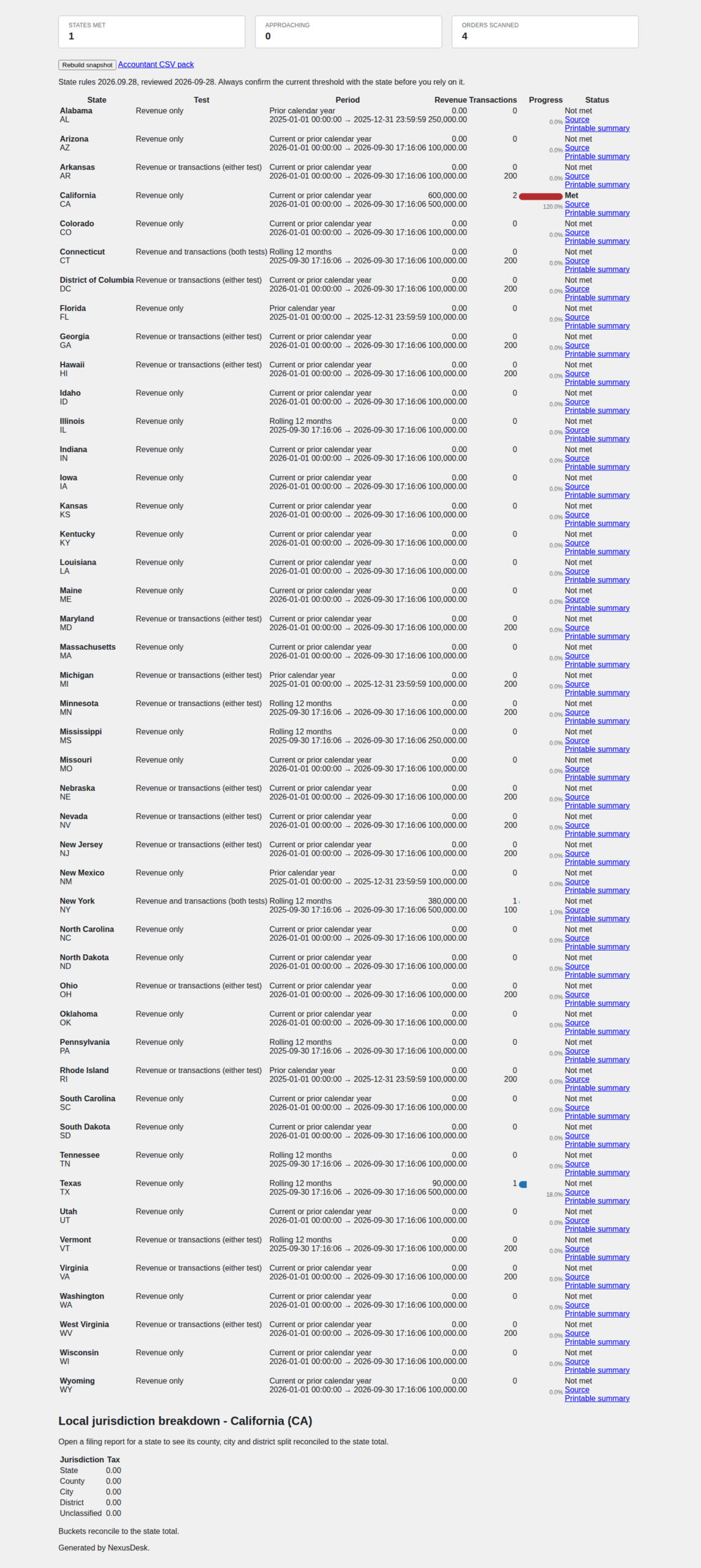
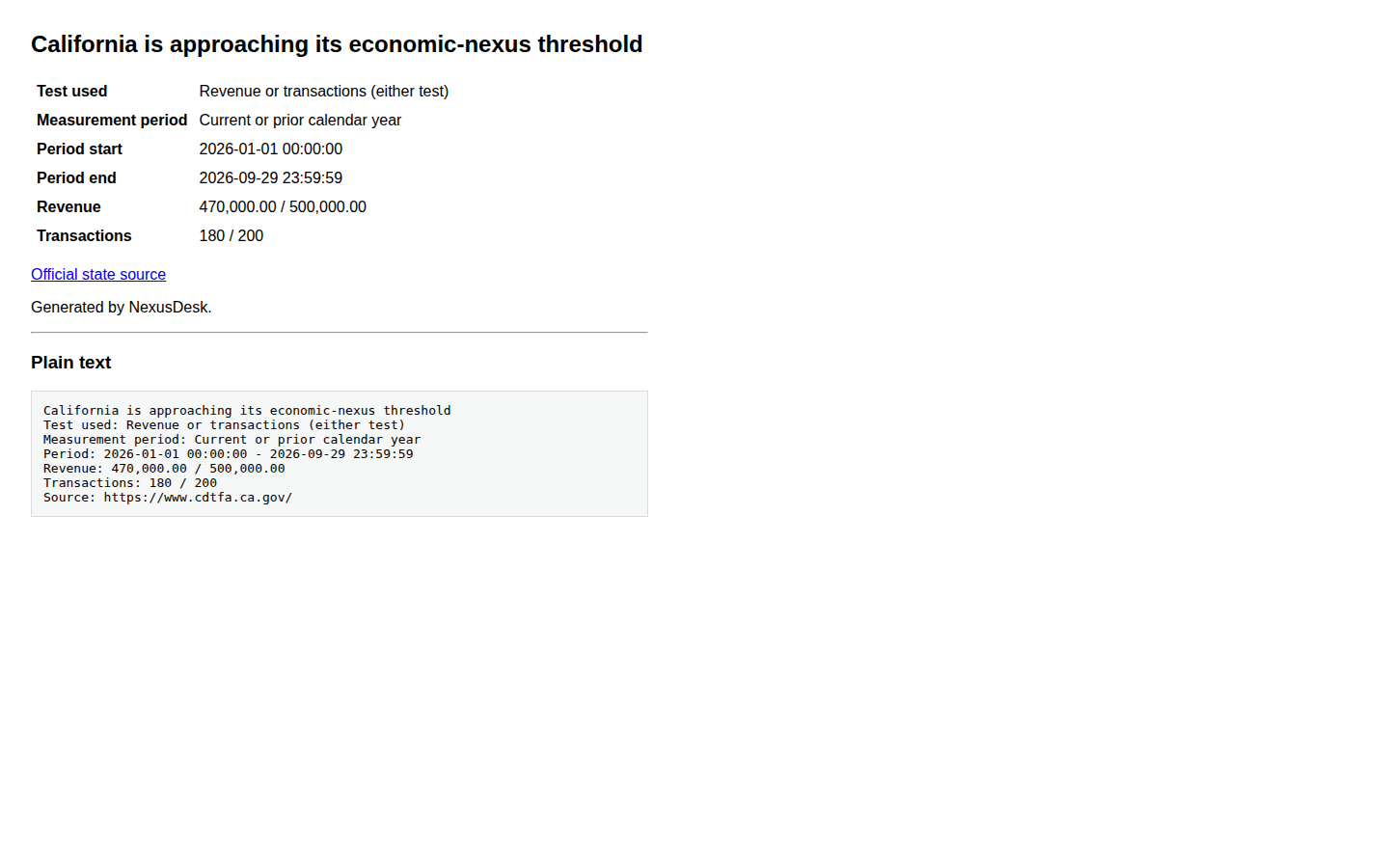
A revenue-only state is never triggered by a transaction count, and a state that uses a revenue-and-transactions test uses the combination that state publishes. Each state is measured over its own measurement period — calendar year, rolling twelve months or prior calendar year — and shows a status of met, approaching or not met, with progress against the threshold. The rules version and its review date are shown on screen, next to a link to the official state source.
Know before you cross the line
A daily scan emails the store as a threshold approaches. The alert names the state, the test used, the measurement period, the revenue or transaction count observed, the threshold and a link to the official state source. A per-state cooldown stops the same alert being sent repeatedly, and the recipient list is yours to set.
County, city and district, reconciled to the state total
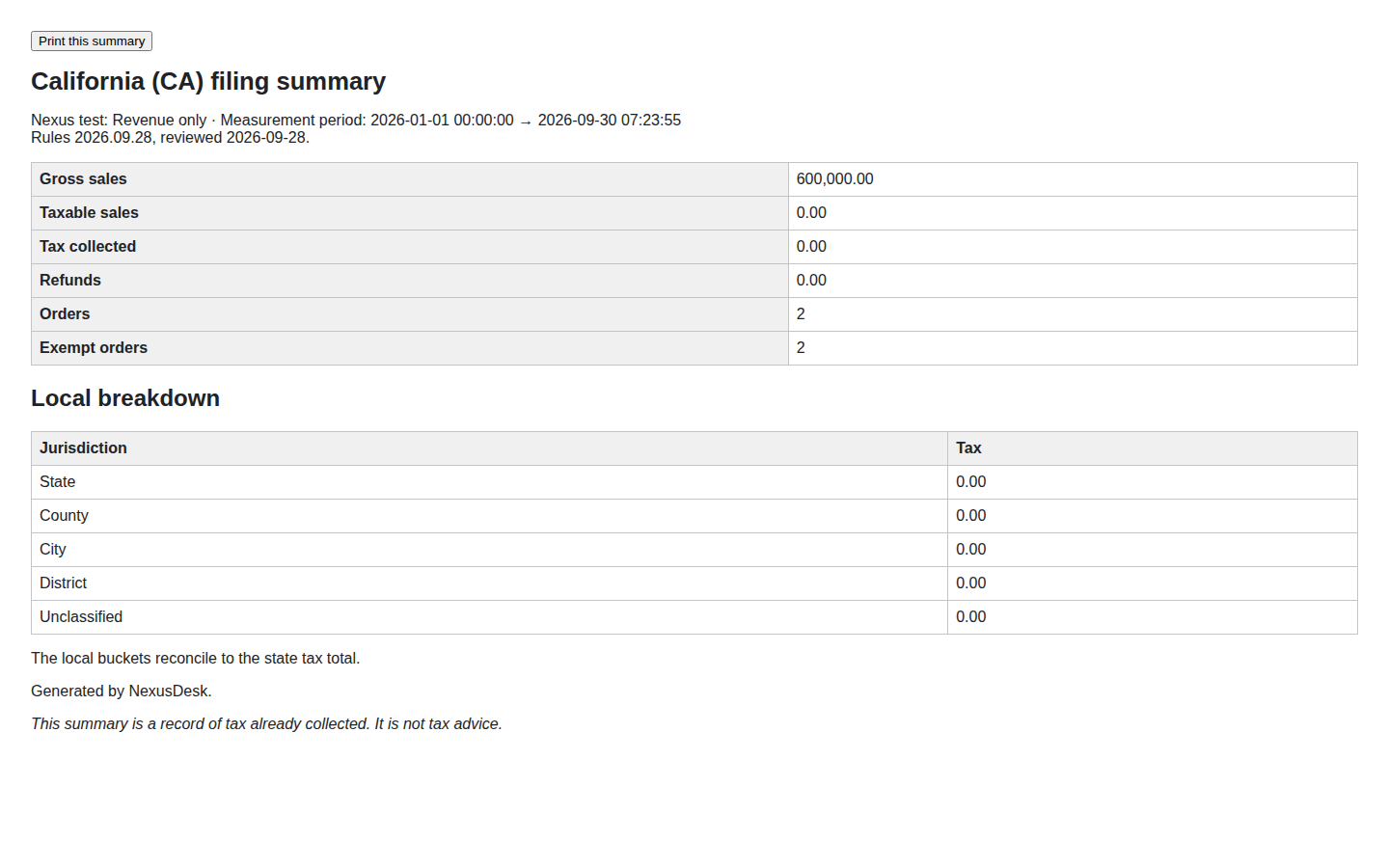
Where local home-rule tax applies, the collected tax is split into county, city and district or special-district buckets and reconciled back to the state total, so every collected cent is accounted for. A rate code that cannot be classified is surfaced as unclassified, never silently dropped into the state figure.
Subscriptions, refunds and exemptions handled honestly
When WooCommerce Subscriptions is active, renewal orders can be counted in the thresholds and reports, with a toggle to exclude them when a state treats renewals differently. Refunds, cancelled and failed orders, and exempt or zero-rated orders are separated out before revenue is counted, so the filing total a state sees is not overstated.
An export pack your accountant can file from
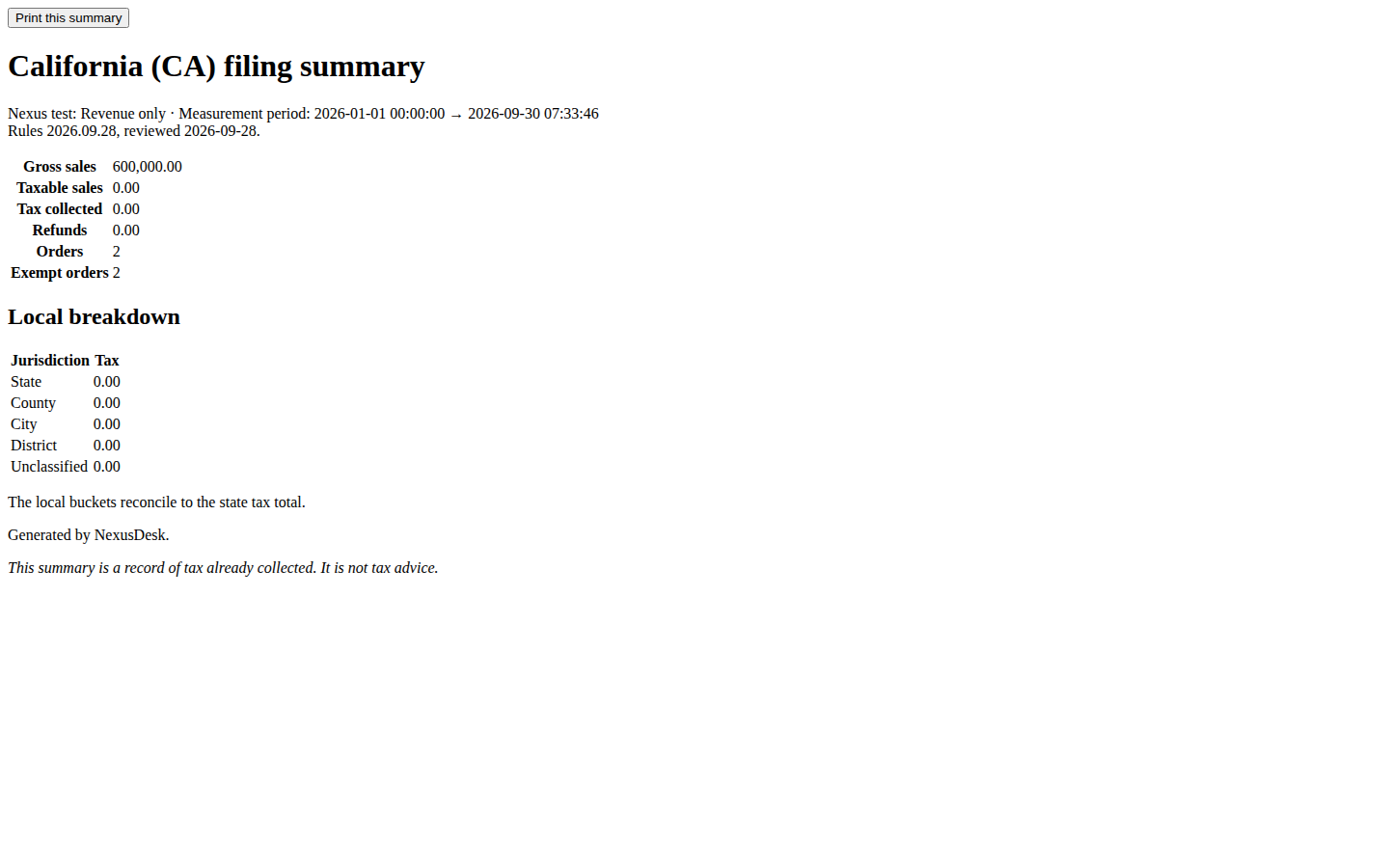
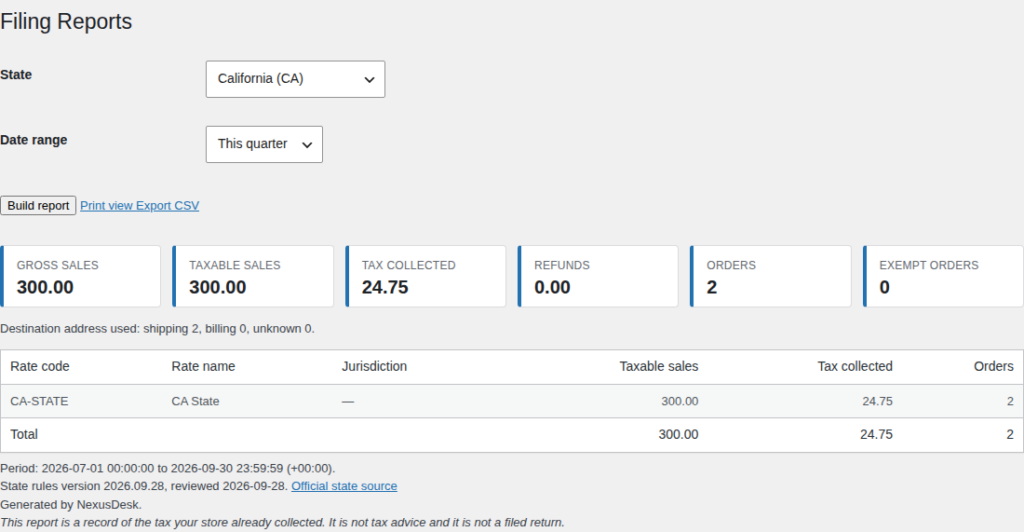
Each state exports as an accountant-ready pack: a CSV grouped by tax rate code and rate name, plus a printable filing summary with audit totals and the local breakdown. The rules version and review date travel with the figures, so the person filing can see which table was used.
What is free, what is Pro, and what is Agency
The single-state filing report is the free NexusDesk plugin, and it is not a trial: nothing in it is withheld to force an upgrade. The multi-state capabilities below ship only in this separate add-on, and the free download contains none of that code.
Free — the single-state filing report (the free NexusDesk plugin)
- Single-state filing report: gross sales, taxable sales, tax collected, order count and refunds, grouped by tax rate code and rate name.
- Refunds, cancelled and failed orders, and exempt or zero-rated orders separated and excluded from the taxable base.
- CSV export and a one-page print view.
- A bundled state-rules table with an official source URL and a review date for every state.
Pro — the multi-state monitor (this add-on)
- Multi-state economic-nexus dashboard that applies each state’s real test: revenue-only states are never triggered by transaction count, and revenue-plus-transaction states use the correct combination.
- The correct measurement period per state (calendar year, rolling twelve months, prior calendar year) with progress against each threshold and email alerts as a threshold approaches.
- County, city and district or special-district breakdown for home-rule states, reconciled to the state total.
- WooCommerce Subscriptions renewal orders included in the thresholds and reports, with a toggle to exclude them.
- Accountant-ready per-state export pack: CSV plus a printable filing summary with audit totals.
Agency — for agencies and multi-store operators (this add-on)
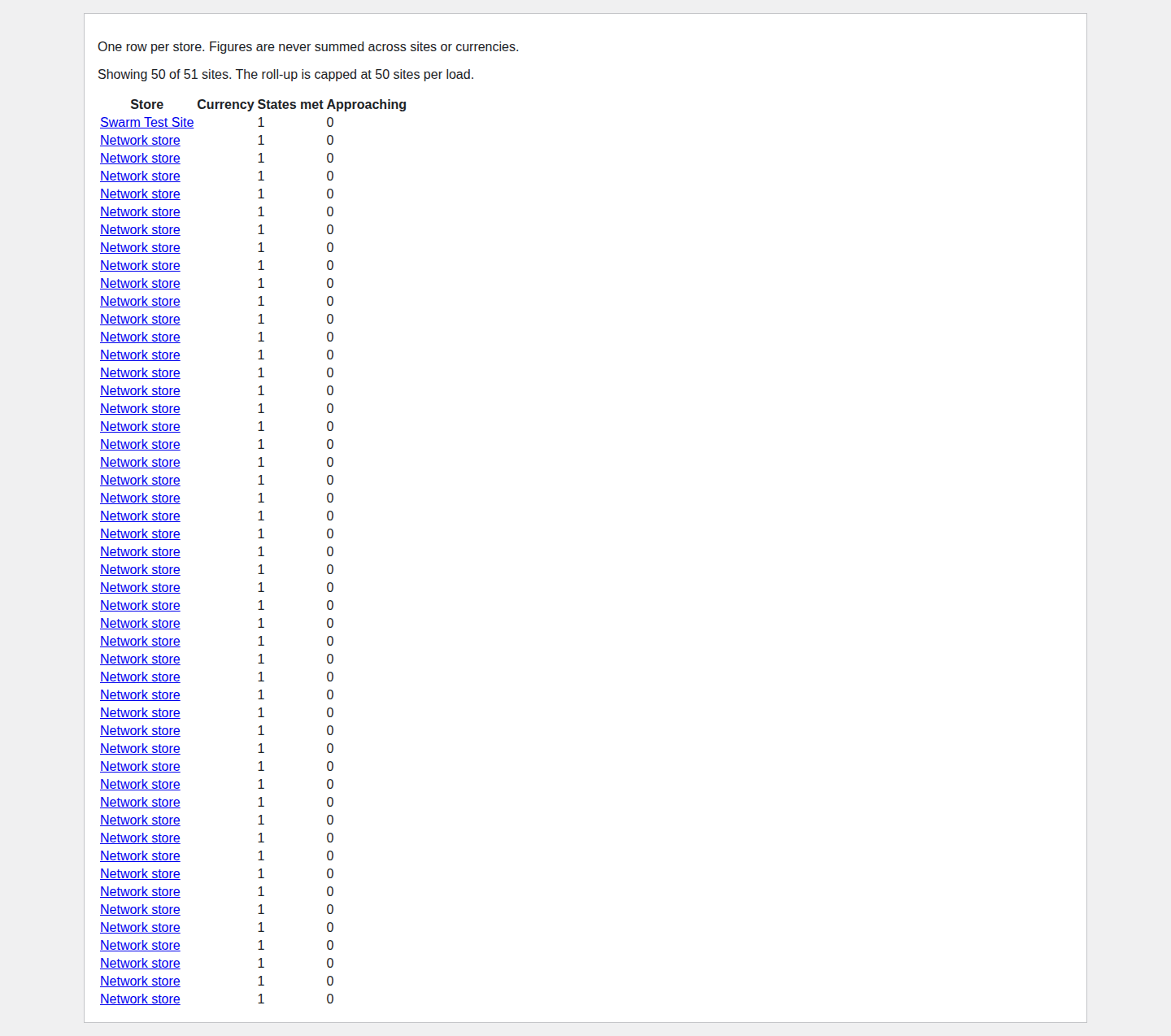
- Multisite network roll-up: one screen showing every store’s nexus position, without mixing currencies or one site’s data into another; a site that cannot be read shows an explicit unknown state.
- Per-client filing report packs with scheduled email delivery on a weekly, monthly or quarterly recurrence.
- White-labelled reports that remove the plugin’s branding from exported, printed and emailed reports.
- Role-based read-only accountant access through a dedicated capability, so a client’s bookkeeper can view reports without changing store data.
How it works
- Install the free plugin first. NexusDesk Pro is an add-on; it needs the free NexusDesk plugin installed and active, and WooCommerce active at runtime.
- Add the licence. Paste the key from your order email into NexusDesk → Settings → Licence. The paid capabilities switch on; with no key the free single-state filing report keeps running exactly as before.
- Open the Nexus Monitor. NexusDesk Pro reads the orders in range through the WooCommerce API and evaluates every state against its own test and measurement period.
- Watch the thresholds. The monitor shows progress and status per state, and the daily scan emails you as one approaches.
- Export and file. Download the per-state CSV and print the filing summary with audit totals and the local breakdown for your accountant.
Requirements
- WordPress 6.0 or higher.
- PHP 7.4 or higher.
- The free NexusDesk plugin, installed and active. NexusDesk Pro does nothing on its own.
- WooCommerce active at runtime. The add-on declares no hard Requires Plugins header, so it activates safely without WooCommerce and shows an admin notice instead of failing; it registers no screen, order hook or REST route until WooCommerce is present.
- HPOS compatible: orders are read through the WooCommerce CRUD API, never the posts tables, so behaviour is identical with High-Performance Order Storage on or off.
- WooCommerce Subscriptions is optional; when it is active, Pro can include renewal orders in the counts.
Frequently asked questions
Does it work with HPOS?
Yes. Orders are read through the WooCommerce CRUD API (wc_get_orders and the WC_Order getters), never through the posts tables, so behaviour is identical whether HPOS is enabled or disabled. NexusDesk declares compatibility with custom order tables on WooCommerce → Status → Compatibility.
What happens when my licence expires?
A Pro or Agency licence is annual, measured from the order date. When it expires, the paid add-on’s features stop and the Nexus Monitor returns to an upsell, while your free single-state filing reports keep working exactly as before. Renewing restores the paid features, and the cached report data is not destroyed.
Does the free version stop working?
No. The free NexusDesk plugin has no time limit and needs no key. Its single-state filing report, refund and exemption handling, per-rate grouping, CSV export and print view are free forever.
Can I use it on client sites?
Yes. A Pro licence covers 3 site activations. An Agency licence covers 10 and adds the multisite network roll-up, scheduled per-client report packs, white-labelled reports, and a read-only accountant role you can hand to a client’s bookkeeper. The plugin is GPL, so you can install and modify it on the sites your licence covers.
Do you offer refunds?
Licences are sold through this store and its published refund policy applies. If NexusDesk Pro does not work as described on this page, email [email protected] and we will help you get it working; if it still is not right, ask for a refund under the store’s terms.
Where is my data stored?
Reports are built and cached in your own WordPress database. No order, customer, tax or report data is sent anywhere. The only outbound request is the licence check described under About the licence, and it carries no report data.
Where do the thresholds come from?
From the free plugin’s bundled state-rules table, which cites each state’s official revenue-department page and its review date. Every value is overridable with the nexusdesk_state_rules filter, and the review date is shown on screen so you can see how current the data is. Always confirm a state’s current threshold with the state.
Does it file my return, or is it tax advice?
No to both. NexusDesk Pro produces a report of the tax your store already collected and shows the figures a state expects. It does not calculate tax at checkout, does not file, e-file, remit or pay a return, and is not tax advice.
About the licence
A Pro or Agency licence is annual and lasts 365 days from the order date. Pro is $59 per year and covers 3 site activations; Agency is $99 per year and covers 10. Both include updates and support for the term; there is no auto-renewal and nothing is charged automatically. Renewal is a new annual licence from this store.
The free NexusDesk plugin needs no key. NexusDesk Pro is sold only through this store and has no WordPress.org listing, so it is not updated from the WordPress.org directory. While a valid key is stored, the add-on contacts the TillFoundry licence server at tillfoundry.com to activate and validate the key and to check for its own updates, which are offered through the normal WordPress update screen. The version of the add-on you download here is the version you have until that updater checks in.
When a key is entered, the licence server records the key, your site URL and home URL, the plugin slug and version, the WordPress and PHP versions, whether the site is multisite, the site locale, and the request IP address. It uses that to activate and validate the licence and to serve add-on updates. No order, customer, tax or report data is involved.
NexusDesk Pro is a reporting and monitoring tool. It does not calculate tax at checkout, does not file, e-file, remit or pay a return, and is not tax advice. Always confirm a state’s current threshold with the state; the bundled rules table shows its source and review date and every value is overridable.
NexusDesk Pro adds 9 capabilities to the free NexusDesk plugin. Pro ($59/year) is the multi-state monitor, jurisdiction breakdown, subscription handling, threshold alerts and the accountant export pack; Agency ($99/year) adds the multisite network roll-up, scheduled per-client packs, white-labelled reports and read-only accountant access. The free single-state filing report is at tillfoundry.com/product/nexusdesk/.
Reviews
There are no reviews yet.