Description
The wishlist button on your shop is a plain link: ?add_to_wishlist=123&_wpnonce=…. Search engines, social scrapers and AI crawlers follow that link on every paginated shop and category page. Each follow is a real request, and on many wishlist plugins it is a real database write, so a wishlist row is created for a visitor who does not exist. robots.txt does not stop spoofed or rotating user agents, and per-IP firewall rules block real customers alongside the bots.
Wishlist Bot Shield inspects the wishlist action request before your wishlist plugin processes it. There is nothing to change in the wishlist plugin and no template to edit.
What it does before your wishlist plugin runs
There is one edition of Wishlist Bot Shield, and every feature is included and free to download and use: no key, no account and nothing held back.
- Nonce guard. A wishlist action request with a missing or malformed nonce is rejected before the wishlist plugin sees it. A valid but expired nonce is challenged rather than hard-blocked, so a shopper on a stale page can still complete the action.
- Known crawler and automation block. Requests whose user agent is a known crawler, scraper or automation tool are blocked, case-insensitively, and only on wishlist action URLs; the list is filterable through wbs_bot_user_agents.
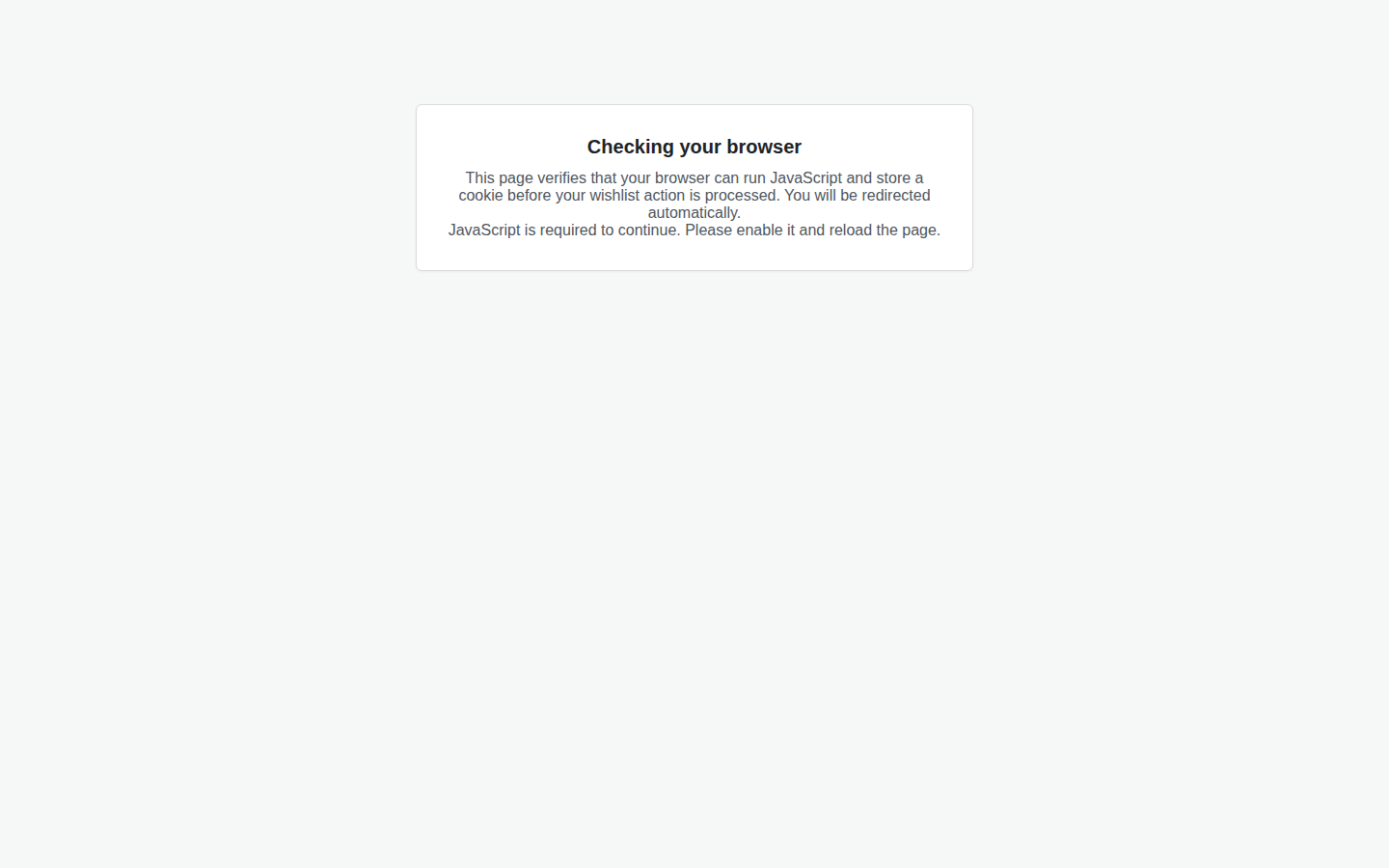
- Browser challenge. Anything that does not look like a browser that has already visited is shown a small self-contained JavaScript and signed-cookie test that a spoofed user agent or a non-executing crawler cannot pass.
- Rate limits. Per-visitor and site-wide windowed limits answer HTTP 429 with a Retry-After header instead of processing another request.
- Monitor mode. Records the verdict and reason that enforcing would have applied, without blocking a single request, so you can confirm the rules match real traffic before you enforce them.
- Blocked-request log and CSV export. A filterable, paginated log of every non-allowed request, with the offending user agent and a salted address hash, plus a WordPress dashboard widget.
- Search leak fix. robots.txt Disallow rules for each watched argument, an X-Robots-Tag: noindex, nofollow header, a noindex robots meta tag, and a canonical link with every wishlist argument stripped.
- Bounded storage. One small log table, salted hashes instead of raw addresses, and daily pruning under a configurable retention period, seven days by default.
See exactly what was happening
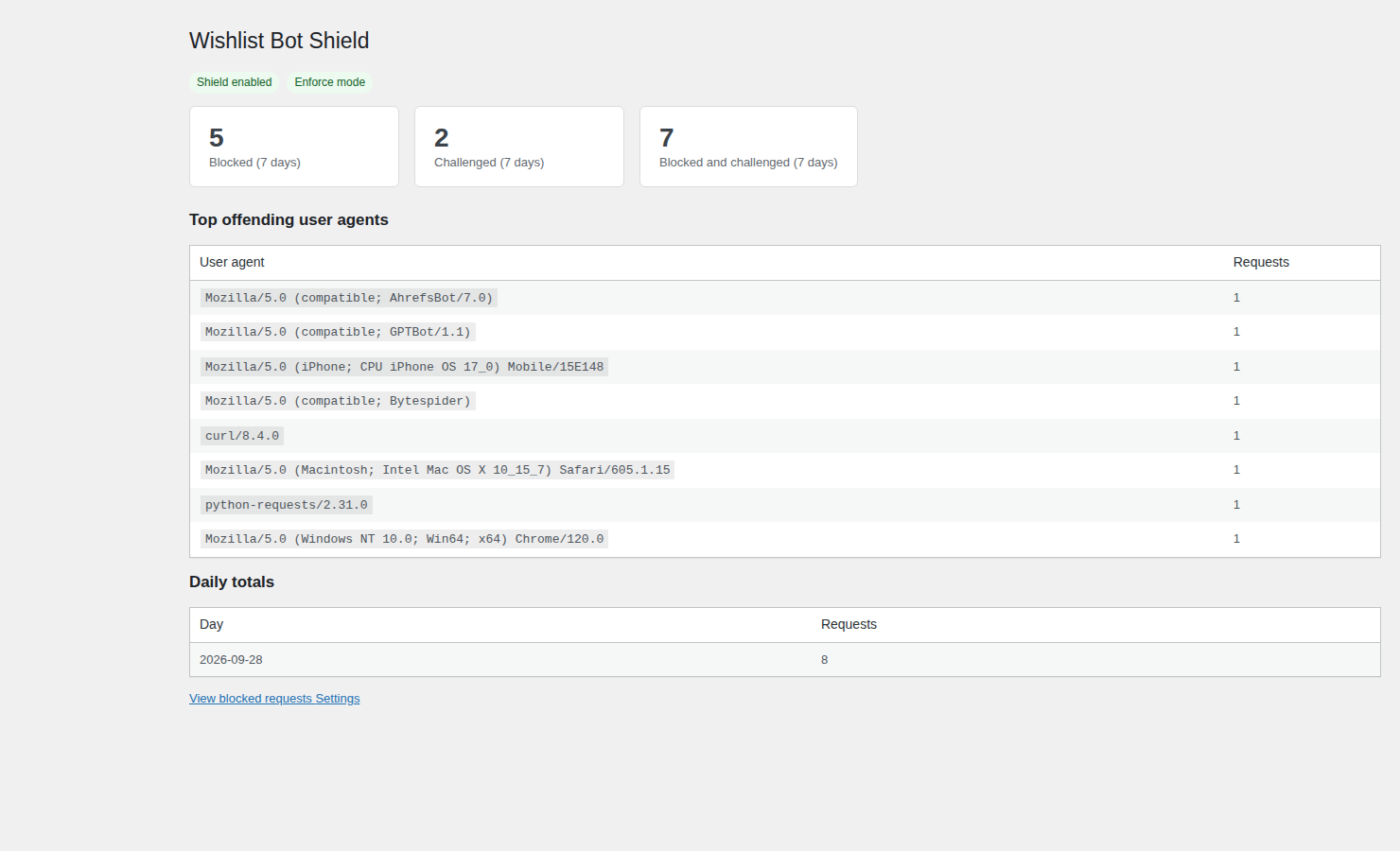
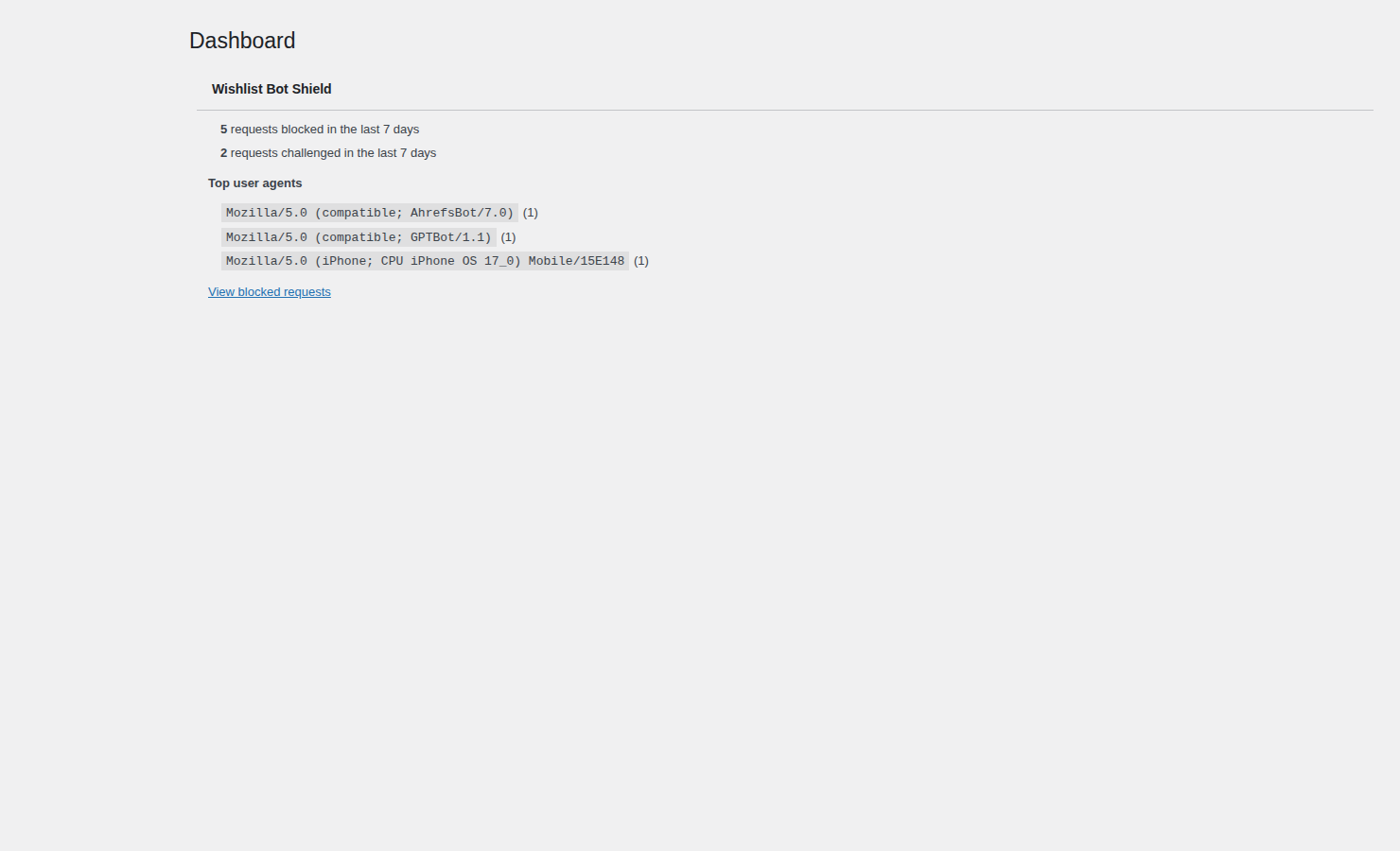
The overview answers what ‘the shop got slow’ cannot: how many wishlist requests were blocked and challenged over the last seven days, which user agents were responsible, and a day-by-day total.
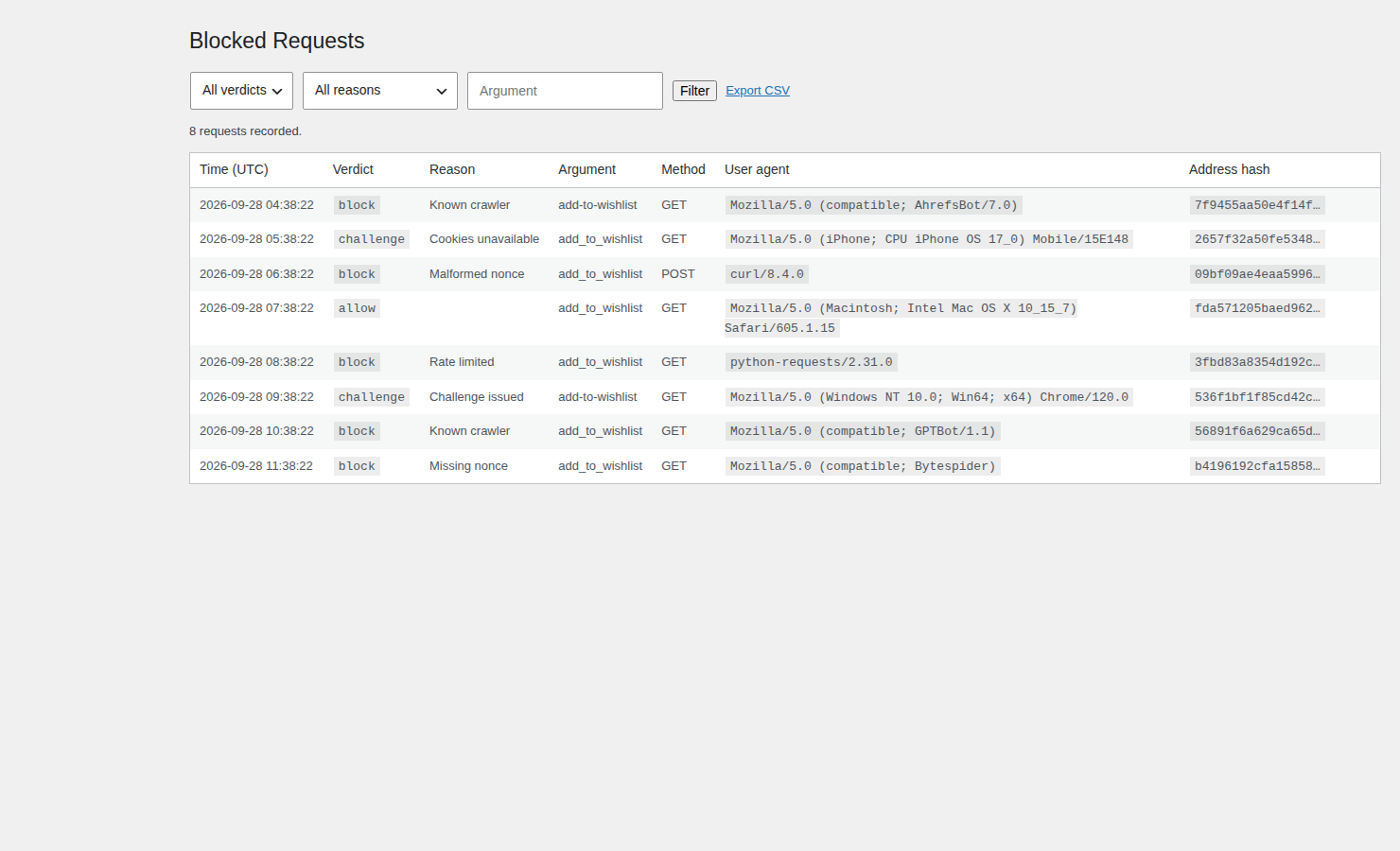
The log names the crawler
Every non-allowed request is recorded with its verdict, its reason, the wishlist argument and the user agent, newest first. Filter by verdict, reason or argument, page through the results, and export the current view to CSV.
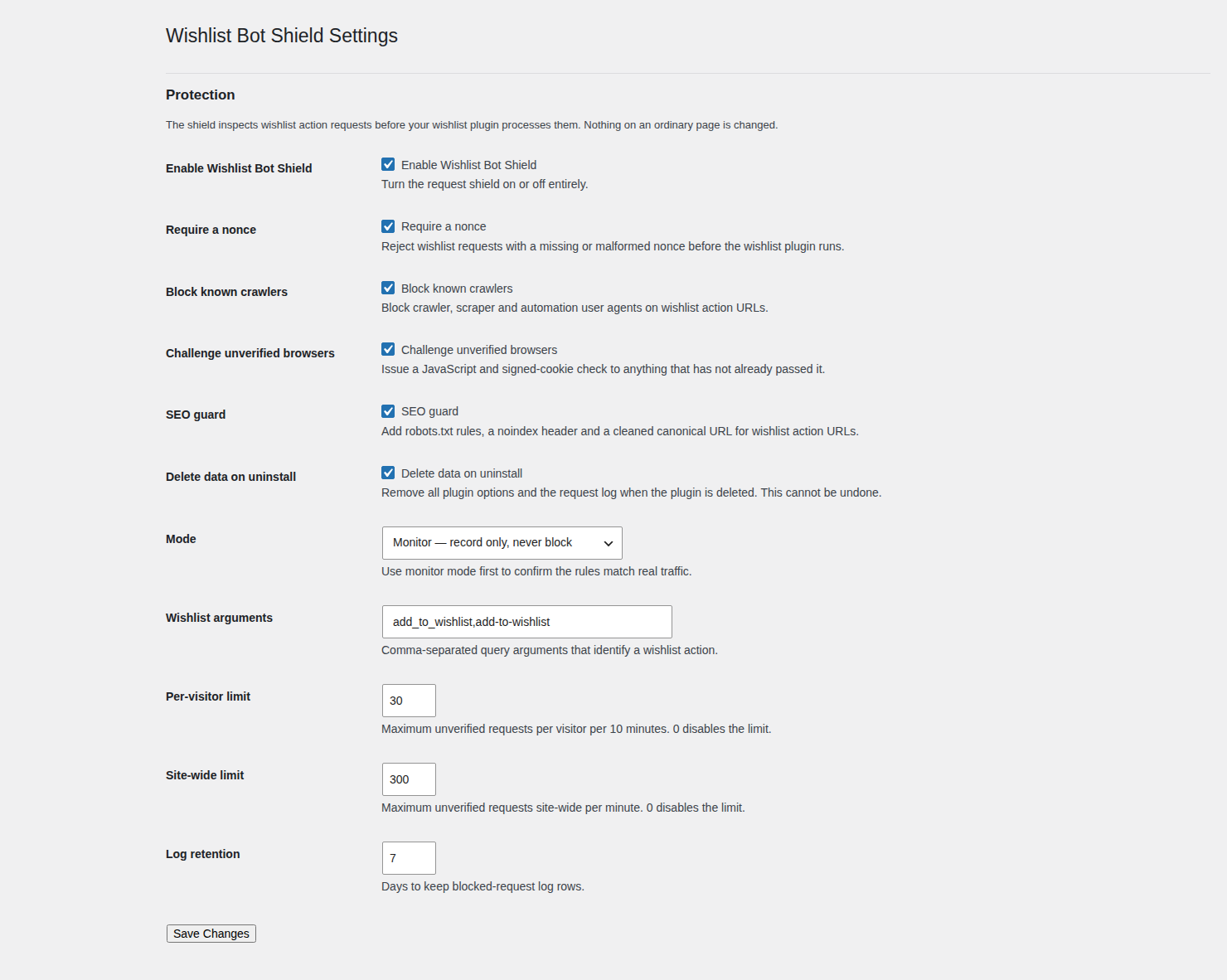
Run it in monitor mode first
Monitor mode records what enforcing would have done and blocks nothing, so you can point it at live traffic before you switch it on. The defaults are conservative: a nonce is required, known crawlers are blocked, unverified browsers are challenged, and the limits start at 30 requests per visitor per ten minutes and 300 site-wide per minute.
A dashboard widget on the screen you already open
The same headline numbers, blocked and challenged over the last seven days with the top offending user agents, appear in a WordPress dashboard widget with a link through to the full log.
Stop the search leak at the source
The plugin also keeps wishlist action URLs out of search results. It adds robots.txt Disallow rules for each watched argument, sends an X-Robots-Tag: noindex, nofollow header, adds a noindex robots meta tag, and rewrites the canonical link with every wishlist argument removed. A request that carries no wishlist argument is untouched: no header, no meta tag, no canonical rewrite and no log row.
How it works
- A request arrives carrying a watched wishlist argument such as add_to_wishlist. A request without one is never inspected.
- The nonce is checked first; a missing or malformed nonce is blocked.
- The user agent is matched against the known crawler and automation list, only on wishlist action URLs.
- Anything else that does not look like a browser that has already visited is shown the JavaScript and signed-cookie challenge.
- What is left is measured against the per-visitor and site-wide limits, and allowed requests reach your wishlist plugin exactly as before. In monitor mode, nothing is blocked and every verdict is still recorded.
What it does not do
These limits are part of the product, not a footnote:
- It does not stop every crawler. A headless, JavaScript-capable crawler can still pass the challenge. The user-agent list, the rate limits and the challenge are all filterable, so the rules can be tightened without a code change.
- A full-page cache or CDN that serves the wishlist URL without invoking PHP is harmless, because no wishlist write happens, but that request is invisible to the log.
- It does not modify the wishlist plugin, its storage or its templates. It inspects the request and leaves everything else alone.
- If the problem is occasional, a firewall rule may be enough. This is for a store where the wishlist argument is a sustained problem.
Requirements
- WordPress: 6.0 or higher.
- PHP: 7.4 or higher.
- WooCommerce: optional. With WooCommerce active the menu sits under WooCommerce and requires the manage_woocommerce capability; without it the menu stays in place, the required capability becomes manage_options, and a dismissible notice appears only on the plugin’s own screens.
- HPOS: not applicable. The plugin reads and writes no order data, so there is nothing for High-Performance Order Storage to change.
- Dependencies: none at runtime, and no account is needed.
Frequently asked questions
Does it work with HPOS?
It does not need to. Wishlist Bot Shield never reads or writes an order, a customer or a session, so High-Performance Order Storage makes no difference to it and no compatibility declaration is required.
Does anything expire or stop working?
No. There is no key, no trial and no time limit, and no capability that switches off. The plugin you download here is the complete plugin. A dormant licence client ships in the bundle but is off by default, and this build provides no screen that accepts a key.
Does a default install contact any outside service?
No. A default install sends no analytics, no telemetry and no licence request. The dormant licence client only contacts the TillFoundry licence server if a site owner deliberately opts in.
Can I use it on client sites?
Yes. There is no key and no account, so you can install it on as many sites as you manage. Settings and the log are per site.
Do you offer refunds?
There is no purchase, so there is nothing to refund. If something is wrong, write to [email protected].
Where is my data stored?
In your own WordPress database, in one custom table: the wishlist argument, the verdict and reason, the method, a truncated user agent and salted hashes of the visitor address and fingerprint. The raw IP address is never stored, the admin screens show only the hashes, retention defaults to seven days, and enabling ‘Delete data on uninstall’ removes the table and the plugin’s options when you delete the plugin.
Updates and licensing
There is no licence key to enter, no annual fee and nothing to renew. This build is not in the WordPress.org plugin directory, so there is no automatic update channel. The version you download here is the version you run; when a newer version is published, download it again from this page.
Proof
WordPress 6.0+, PHP 7.4+, WooCommerce optional, no runtime dependencies, no account. One small log table with salted hashes rather than raw addresses, seven-day default retention, delete-on-uninstall, and no outbound request on a default install. HPOS is not applicable because no order data is read or written.
Wishlist Bot Shield is free to download and use. If you run a large catalogue and the wishlist argument is a sustained problem, it does its job before your wishlist plugin ever sees the request.
Reviews
There are no reviews yet.